
Best Payroll Software in Australia for Small Businesses (2025 Guide)
Choosing the best payroll software for your small business can feel overwhelming. There are many systems, each promising to save time and keep you compliant with STP, awards and super. However, the right choice depends on your staff numbers, pay rules and budget. In this guide, we walk through the main options Australian businesses use, explain common payroll problems and show how different systems can help fix them.
1. What makes the best payroll software for small businesses?
Running payroll with spreadsheets might feel cheap, but it is risky once you have awards, overtime, leave, PAYG, super and Single Touch Payroll (STP) to manage. A small mistake can easily turn into an underpayment, a Fair Work enquiry or a late STP notice from the ATO.
The best payroll software for your business is the one that keeps you compliant, fits your industry and is simple enough for your team to use every pay run. It should calculate tax and super automatically, handle changes like rate rises and award updates, and talk to your accounting system so you do not have to enter figures twice.
Payroll snapshot – Fortnight ending 28 Feb 2025
A simple view of wages, PAYG, super and STP status for a small business with 8 employees.
Wages by employee – this pay run
Illustrative only — amounts shown as rounded figures.
Payroll summary – Fortnight ending 28 Feb 2025
Example only — figures are rounded for illustration.
| Item | Amount | Notes |
|---|---|---|
| Total gross wages | $32,480 | Before PAYG and superannuation |
| PAYG withheld | $7,210 | To be included on next BAS |
| Superannuation (SG 11.5%) | $3,735 | Employer super on eligible earnings |
| Net pay to employees | $25,270 | Total bank transfer across all employees |
| STP lodgement status | Lodged | Submitted to ATO on 28 Feb 2025 |
This dashboard is an example only. Actual payroll reports should be generated from your live system (Xero, MYOB, QuickBooks, Employment Hero or similar) and checked against awards, contracts and ATO rules.
In this guide we walk through the main payroll options used by Australian small and medium businesses and share the situations where each system tends to work best.
2. Overview of leading payroll software in Australia
There is no single product that suits every small business. However, a handful of systems come up again and again in discussions with our clients. The list below focuses on tools that support STP and are commonly used by Melbourne business owners.
2.1 Xero Payroll
Xero Payroll is built into Xero, so it suits owners who already use Xero for bookkeeping and want everything in one place. It handles standard PAYG, super and leave, and it files STP directly with the ATO.
- Good fit for professional services, trades and simple awards.
- Employees can use the Xero Me app to view payslips and request leave.
- Works smoothly with Xero bank feeds, BAS and reporting.
2.2 Employment Hero Payroll (KeyPay)
Employment Hero Payroll (previously KeyPay) is strong on awards and rostering. It is often used in hospitality, retail and businesses with complex penalty rates or many casual staff.
- Automated award interpretation for many modern awards.
- Roster, time and attendance, and payroll in the same system.
- Powerful, but can feel heavy for very small teams.
2.3 MYOB Business Payroll
MYOB Business includes integrated payroll for owners who prefer MYOB for accounting. It works well for long-standing MYOB users who do not want to move their entire system.
- Single product for accounting and payroll.
- STP enabled with direct ATO reporting.
- Interface can feel dated compared with newer cloud tools.
2.4 QuickBooks Online Payroll
QuickBooks Online Payroll suits businesses that already use QuickBooks for bookkeeping. It covers the core payroll pieces and connects cleanly to QuickBooks ledgers and BAS.
- Cloud based with STP, PAYG and super.
- Simple to run for straightforward pay structures.
- Fewer local partners than Xero or MYOB in some areas.
2.5 Payroller
Payroller is a low-cost cloud payroll option used by many micro businesses and sole traders with a handful of staff. It focuses on STP and basic payroll rather than full accounting.
- Useful when you only need payroll, not a full accounting system.
- Can be a stepping stone for start-ups before they move to Xero or MYOB.
- More manual work is needed to line up payroll with your accounts and BAS.
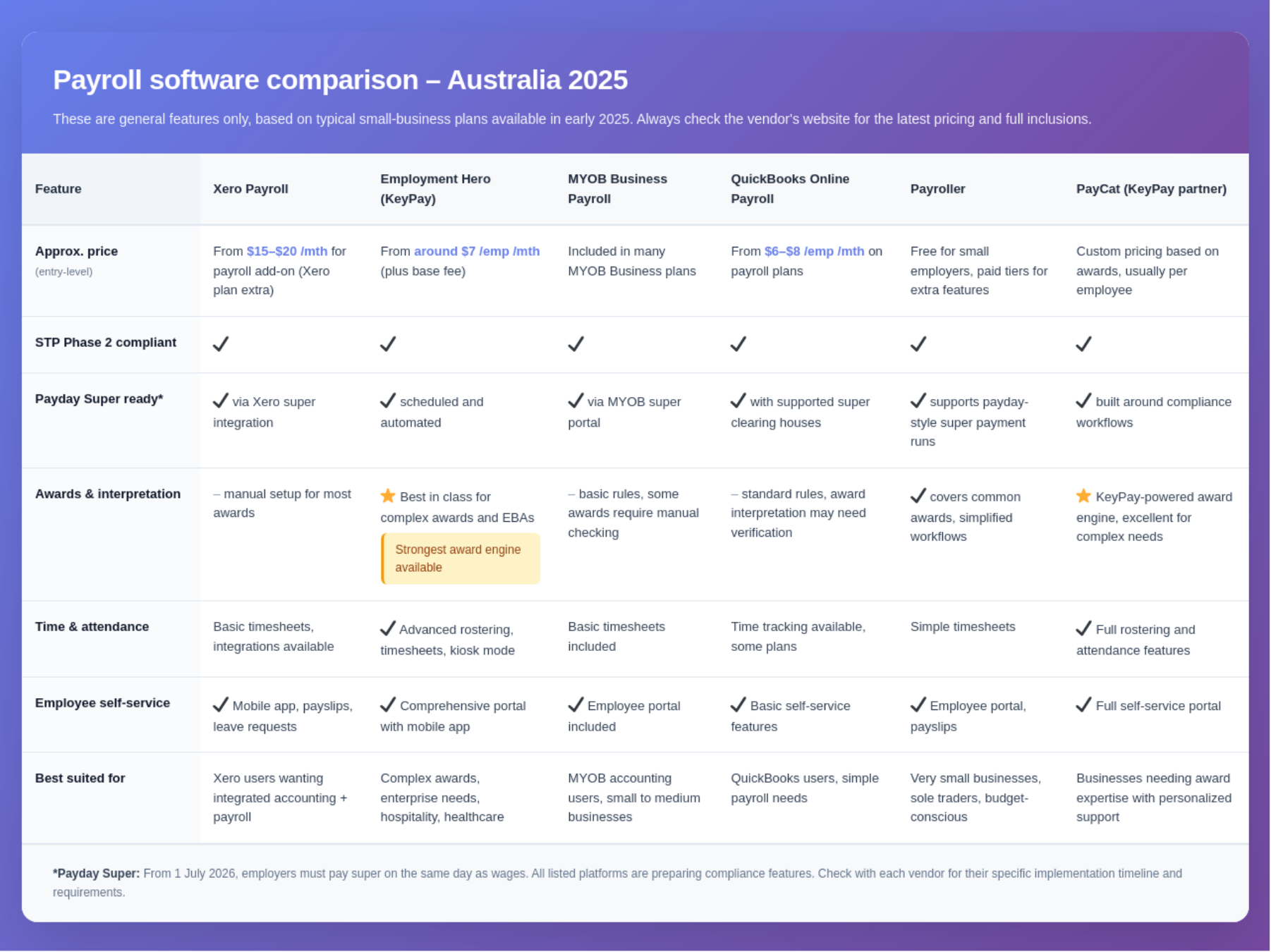
3. Matching payroll software to your business
3.1 When you already use Xero, MYOB or QuickBooks
If your bookkeeping is already in Xero, MYOB or QuickBooks, staying within the same family usually keeps life simpler. You avoid double entry, your BAS lines up with payroll reports and your accountant can see everything in one system.
- Start by checking whether your current package includes payroll or needs an add-on.
- Confirm that STP is set up and connected to the correct ABN and branch.
- Review your chart of accounts so wages, super and PAYG flow to the right places.
3.2 When you need strong award and rostering support
For hospitality, retail and care industries, award rules and penalty rates can be intricate. In these cases, systems such as Employment Hero Payroll may be worth the extra investment. They are designed to reduce manual award interpretation and provide a clear audit trail.
- Check your specific award is supported and kept up to date.
- Test a few real shifts through the system before going live.
- Make sure managers understand how timesheets and approvals flow into payroll.
3.3 When cost is your main concern
New businesses often focus on price first. That is understandable, but it is still important to think about the total cost of errors and rework. A slightly higher monthly fee can be cheaper than fixing underpayments later.
- Compare not only subscription fees, but also setup time and support.
- Look for clear training resources and local help when you need it.
- Plan for where the business will be in two or three years, not just today.
4. Common payroll pain points these systems can fix
4.1 Issues we see in real small businesses
Many owners contact us after a stressful payroll event. Sometimes the problem is a missed STP lodgement. Sometimes a staff member has queried their super or leave. In other cases, an accountant has spotted that payroll totals do not match the BAS.
4.2 How modern payroll software helps
- Late or missing STP lodgements. Automated STP filing and reminders reduce the chance of forgetting a submission.
- Incorrect superannuation. Most systems automatically calculate Super Guarantee on eligible earnings, using the current rate.
- Award underpayments. Payroll tools with built-in award rules help calculate penalties and overtime correctly.
- Messy leave balances. Employee self-service apps display leave balances clearly, which cuts down on confusion.
- Re-keying timesheets. When timesheets flow straight into payroll, errors and admin time both drop.
Software does not remove the need for good setup. It still needs correct pay items, categories, leave rules and super settings. A short review by a bookkeeper or BAS agent can catch many issues before they become serious.
5. Getting ready for Payday Super and rate changes
From 1 July 2026, the ATO will introduce Payday Super. This means employers will need to pay employees’ super at the same time as each pay run, rather than quarterly. As a result, super will become a normal part of your weekly or fortnightly workflow.
At the same time, the Superannuation Guarantee rate is scheduled to increase to 12%. Payroll software will need to apply this change automatically. Employers will also need to review budgets, pricing and cash flow to reflect the higher ongoing super cost.
Because of these changes, it is wise to choose a payroll system that is actively maintained and clearly communicates how it will handle Payday Super and future rate increases. For official guidance, keep an eye on the ATO and Treasury updates about superannuation and Payday Super.
You can read more about Payday Super and employer obligations on the Australian Taxation Office website and Treasury announcements as new details are released.
6. Quick checklist before you change payroll software
Before committing to a new system, it helps to step back and look at the bigger picture. The checklist below has come from real implementation work with Melbourne businesses.
- Confirm which accounting system you will connect to (Xero, MYOB, QuickBooks or another platform).
- List your awards, pay rules and allowances so they can be set up correctly.
- Decide who will approve timesheets and leave, and how they will be trained.
- Plan a test pay run and compare it to your current system before going live.
- Schedule your changeover at a quiet time in the month, not on BAS week.
7. How RJ Partnering can help with payroll setup and review
Setting up payroll correctly once is far easier than fixing problems later. As CPA-qualified bookkeepers and a registered BAS agent, RJ Partnering works with Melbourne businesses to choose the right payroll system, set it up properly and keep it aligned with awards and ATO rules.
We can review a sample of your recent pay runs, compare them with your awards and check that wages, PAYG and super all reconcile with your BAS. Then we explain the results in plain language and help you decide whether to optimise your current system or move to a better fit.
If payroll has been sitting on your “fix one day” list, now is a good time. Payday Super and super rate increases mean more money is flowing through each pay run, so it is worth making sure the numbers are right.